Here's how to deal with iTunes' corrupted or incompatible backup error
 Apple just launched the new iPhone 8
and a lot of older iPhone buyers are upgrading to it. If you are a
sensible person, you would have backed up your old iPhone to your
computer using iTunes (let's be real, none of us are paying Apple for
more iCloud storage for cloud backup). But when you get your shiny new
iPhone 8 (or any of the other iPhones that are still on sale) and try to
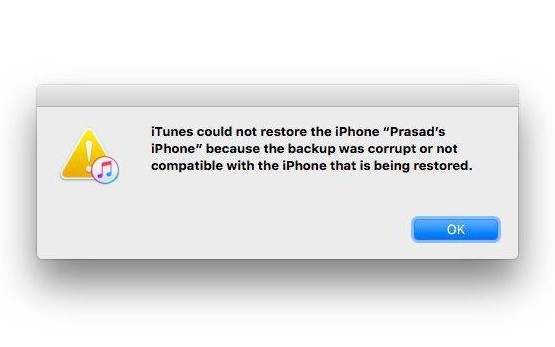
restore from your old back, your iTunes throws this in your face.
Apple just launched the new iPhone 8
and a lot of older iPhone buyers are upgrading to it. If you are a
sensible person, you would have backed up your old iPhone to your
computer using iTunes (let's be real, none of us are paying Apple for
more iCloud storage for cloud backup). But when you get your shiny new
iPhone 8 (or any of the other iPhones that are still on sale) and try to
restore from your old back, your iTunes throws this in your face.The problem is here that iTunes is an even bigger pile of trash than what we already thought it was. Fortunately, your backup is still usable and all you need to do is upgrade your phone.
The problem arises because your old iPhone was likely running iOS 11.0.1 when you backed it up but the new iPhone that you just pulled out of the box is running iOS 11 (or even older). This creates a mismatch of OS versions, as iTunes can only restore a backup to a device running the same version of iOS as the backup.
Because of this, the first thing you need to do is use iTunes to update your phone to the latest version. It could be a version same as your backup or newer (but not older) and once you do that, your backup will magically work again with your new iPhone.
It's a real shame that post had to be written and this could have been avoided if iTunes just showed a more sensible error message or guided the user on what needs to be done.
Still, the iTunes backup is a magical thing that backs up literally everything on your phone, from your photos to your videos, applications, application settings, device settings, home screen arrangement, network settings and so much more and it would be a shame to miss out on all of that and start over from scratch. So if you have the backup still around and you couldn't restore it due to the stupid error, you could try this method and give it another shot.


Comments
Post a Comment
Kindly Comment Only related to Post